
Key takeaways
- Keep the current store running while you evaluate a private preview; changing a design and changing the domain are separate decisions.
- A public URL scan can use visible catalog and page content. It cannot retrieve private orders, customer consent, payment credentials or hidden stock records.
- Reconcile products, variants, prices, stock and lot documents against source records before publishing.
- Torva does not import past orders. Retain your old order records and a clear plan for completing open orders.
- Test relevant permanent redirects and the complete purchase journey. A redirect map helps preserve links, but rankings can fluctuate during a move.
Start with a preview, then decide whether to move
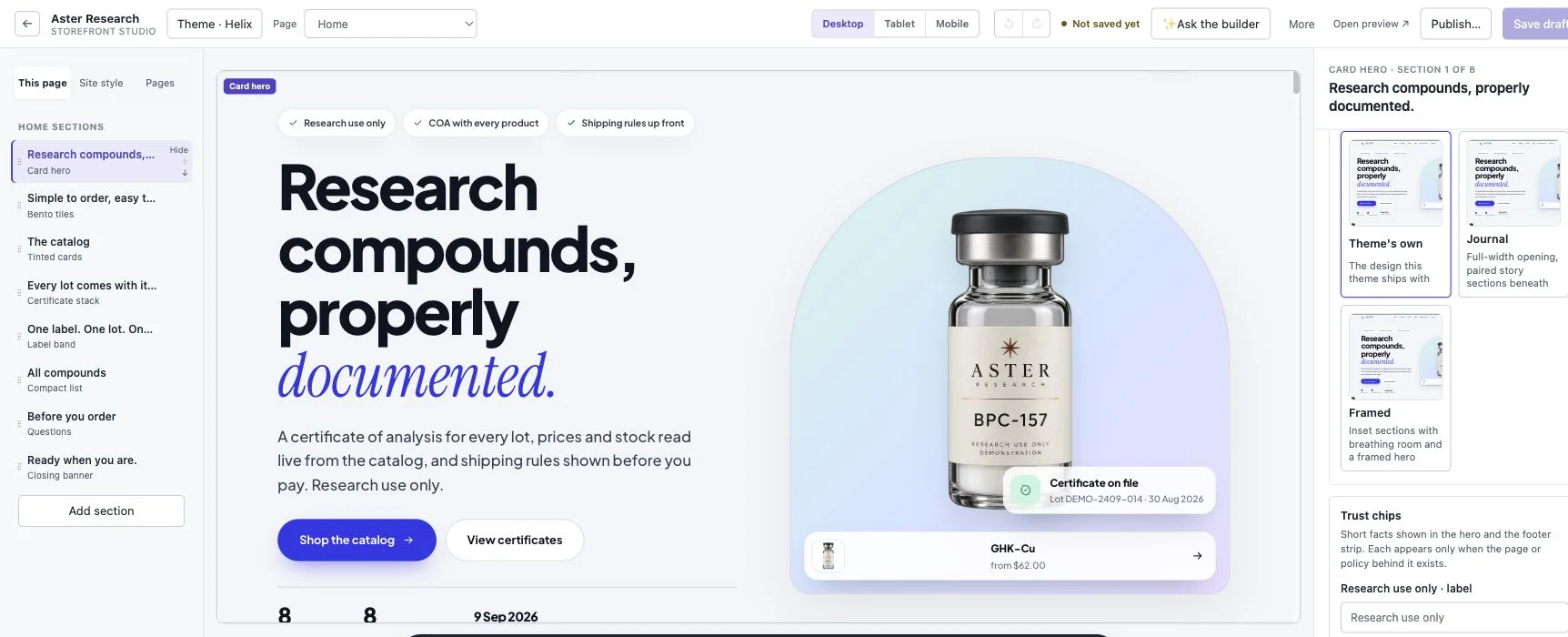
Torva OS is commerce software for research-supply stores. On Growth and Command, it can prepare a private storefront preview from an existing public store URL. This helps you compare the catalog, product presentation and mobile experience before making a launch decision. It does not complete the operational migration.
Keep the old store taking orders while you work. Write down the reason for moving and the workflows that must survive: the payment integration, current customer records, shipping routine, documents and URLs. If an essential requirement has no replacement, resolve that gap before changing the domain.
Torva currently does not offer subscriptions, ACH or crypto checkout. Its app ecosystem is smaller than the large general platforms. A visually stronger preview is useful evidence about design, but it cannot establish that every integration or operational requirement has been replaced.
Inventory the source records before importing
Export the catalog from the current platform and keep the original file unchanged. A structured export gives you a reference for counts, variant identifiers, prices and stock. Download original product images and documents where you have access to them rather than depending indefinitely on an old platform’s file URLs.
Export customer records separately, retaining marketing-consent fields and the source of those records. A public scanner cannot see them. Do not infer consent from an email address, and do not copy payment credentials into a spreadsheet. Keep private exports in your own controlled storage.
Record connected services and operational settings: shipping zones and rates, tax settings, active discount codes, email delivery configuration and any apps that change the order flow. These need explicit setup and checking; they are not proved by a catalog preview.
| Record | Useful source | What to check in Torva |
|---|---|---|
| Products and variants | Catalog CSV plus public pages | Identifiers, counts, prices, stock, images and quantity rules |
| COAs and lots | Original files and product/lot register | Readable document, correct product and lot, working public link |
| Customers and consent | Authorized private customer export | Mapped fields; retain consent records separately if needed |
| Historic and open orders | Old admin and order export | Archive historic records; fulfill open orders in the chosen system |
| Pages and old URLs | Page inventory and URL export | Content review and a tested destination for each important URL |
| Payments and services | Provider accounts and settings | Supported integration, account eligibility and the actual order flow |
Worked example: reconcile a small catalog
Imagine a store with 40 products, 80 variants and 10 published COAs. These are illustrative inputs, not results from a Torva merchant. Save the source counts and make a checklist for every document’s product and lot. After rebuilding or importing, compare the new records with that checklist.
If the draft has 40 products but only 79 variants, the product count alone is misleading. Find the missing variant, compare its price and stock with the source, and check it on the storefront. If nine document links open and one fails, repair that link and check the original before calling the documentation ready.
Choose a product with a quantity price and test one unit below the threshold, exactly at it and one above it. Compare unit and total prices in the product page, cart and checkout. Try an unavailable variant as well. Record discrepancies while the current store remains live; a polished screenshot is not the completion marker.
Review the whole experience on a phone
Torva offers eight theme directions with a visual editor for supported sections and page layouts. Choose a direction for the brand, then open the catalog, a product, its documentation, cart and supporting policies with your actual content. Read long titles and use the menu, research acknowledgment and variant selector.
Test the payment methods your store is actually configured to offer. A displayed button or a checkout success screen does not establish a completed live payment. Use the provider’s appropriate test mode, inspect the resulting order record and confirm the expected customer email. For manual payments, inspect the awaiting-payment state and the staff confirmation step.
Every payment provider and bank decides whether your business and catalog are eligible. Torva supplying checkout instructions does not grant that permission. Before launch, have the responsible person check the connected account and understand which payment states allow fulfillment. A label purchase is separate from carrier acceptance.
Map URLs before changing the domain
Build a list of old product, collection and useful content URLs, including links used in customer emails. A public scan and standard URL patterns can seed the map, but discovered pages are not necessarily the complete inventory. Reconcile the map with your own export and any important landing pages.
Each old address should have a relevant new destination, using a permanent redirect where appropriate. Avoid sending every removed product and article to the homepage. Test a sample from each URL pattern, plus the pages that bring visitors or have important external links, before and after the domain switch.
Google says site moves can involve temporary ranking fluctuations while pages are crawled and indexed. Redirects help users and search engines follow the change; they do not promise unchanged rankings or a fixed recovery date. Update internal links and the sitemap, and use Search Console to observe the move rather than assuming launch success establishes search visibility.
Make cutover a controlled final step
Assign an owner to the switch and choose a time when the team can watch new orders. Export a final catalog snapshot and decide how to handle changes made since the draft was created. Reconcile stock again so orders taken on the old store are reflected in the new one.
Finish existing open orders in the chosen system and keep a register so the same order is not fulfilled twice. Retain access to historic invoices, refunds and customer-support context. Torva does not import past orders, so removing the old subscription or admin access too early can leave gaps.
Before changing DNS, record the current configuration and the recovery steps for your previous host. Preserve unrelated records used for mail and other services. Once the domain points to the new storefront, test the homepage, old product links, document links, phone checkout and order emails on the public domain.
Write down the conditions that would stop the launch or require restoring the previous site, such as an unavailable payment path or incorrect prices. A recovery plan also needs to account for any new orders created after the switch; changing DNS alone does not reconcile those records.
Start with your own catalog
Preview your store free, no card needed. If you already have a website, use its public address to evaluate a rebuilt draft. Check the result against source records before committing to a plan or changing the domain.
The moving help guide explains the product workflow, and the launch checklist gives the team a final review. Subscriptions are open; a preview remains a draft until the setup and launch checks are complete.
Frequently asked questions
What does a Torva public-store scan transfer?
It can use visible catalog, images, published documents and page content to prepare a preview. Review the result against your original records. It cannot retrieve private customer records, consent, order history or payment credentials.
Can I import old orders into Torva?
Torva does not import past orders. Keep an export or access to the old system, and make a separate plan for open orders, refunds and support records.
Can I keep my existing domain?
Yes, if you control it. Prepare and test the new store first, record the current DNS configuration, preserve mail records and change the storefront destination as the final cutover step.
Will redirects preserve my search rankings?
Permanent redirects to relevant new pages help preserve useful links. Search engines still need to crawl and index the changed site, so temporary ranking changes are possible and unchanged rankings cannot be promised.
Can I try Torva before paying?
Yes. The free preview needs no card. An existing public website can be used to evaluate a rebuilt draft; the preview is separate from a completed migration and live-store launch.
Sources
Preview your store on Torva OS — no card needed — or explore the Desk demo, the eight themes and the plans. Questions: hello@torvaos.com.
General information for merchants, not legal, tax or financial advice. Check the rules in your jurisdiction and with your providers.